HOWTO — Run a CLike project from Claude Code or Codex (MCP)
Claude Code and Codex can drive a CLike project end to end through MCP: read the plan and the
reports, run the Harper phases, /eval --fix, /gate, /finalize, and the next release with
/idea --extend. CLike stays in charge: every phase runs through the same governed flow as the
chat (locked tests, regression, gate, promotion, write rules), so an agent cannot do through MCP
what the developer could not do in the chat.
The whole picture: clike-at-a-glance.md. The same flow with BMAD, from
/init: howto-mcp-bmad-claude.md.
1. The two MCP servers
| Server | URL | Token | What it does |
|---|---|---|---|
clike — orchestrator |
http://localhost:8080/mcp/ |
CLIKE_API_TOKEN (the service token in .env) |
reads: plan, REQs, next REQ, status, documents, eval/gate reports, RAG search |
clike-ext — VS Code extension |
http://localhost:55742/mcp |
the extension MCP token (CLike: Copy Extension MCP Token) | runs phases: harper_run_phase, eval_run, gate_check, harper_run_status, cancel_run, … |
The extension server needs VS Code open on the project, with the CLike extension active. Use
localhost in every URL (managed Claude Code policies often allow only http://localhost*).
2. Set it up once
- The CLike stack is running (
docker/rebuild.shorpodman-compose up -d). - Export the service token in your shell profile (same value as
CLIKE_API_TOKENin CLike’s.env; it is never written into a project file):# ~/.zshrc export CLIKE_API_TOKEN="$(grep -E '^CLIKE_API_TOKEN=' ~/dev/authenticfake/clike/clike_mvp/.env | cut -d= -f2-)" - Turn on the extension server: VS Code setting
clike.mcp.extensionServerEnabled = true, reload the window, run CLike: Copy Extension MCP Token, and export it:export CLIKE_EXT_MCP_TOKEN="<paste>" - Claude Code — a
.mcp.jsonin the project root (no secret inside; commit it if you like):{ "mcpServers": { "clike": { "type": "http", "url": "http://localhost:8080/mcp/", "headers": { "Authorization": "Bearer ${CLIKE_API_TOKEN}" } }, "clike-ext": { "type": "http", "url": "http://localhost:55742/mcp", "headers": { "Authorization": "Bearer ${CLIKE_EXT_MCP_TOKEN}" } } } }Start
claudefrom the project folder (after exporting the tokens), approve the project servers, check them with/mcp. To skip the per-tool prompts, allowmcp__clikeandmcp__clike-extinpermissions.allow. - Codex:
codex mcp add clike     --url http://localhost:8080/mcp/  --bearer-token-env-var CLIKE_API_TOKEN
codex mcp add clike-ext --url http://localhost:55742/mcp --bearer-token-env-var CLIKE_EXT_MCP_TOKEN
and in
~/.codex/config.toml, under[mcp_servers.clike]and[mcp_servers.clike-ext]:default_tools_approval_mode = "approve"(codex execcannot ask). Keepwait_secondsbelow Codex’stool_timeout_sec.
3. Run a project
Open the project folder in VS Code (under CLIKE_PROJECTS_DIR); harper_init initializes it in
place. From then on everything can run through MCP. Put the requirement documents in docs/inputs/ (UI
material in docs/harper/ux/, background in docs/reference/).
| Step | Tool call (clike-ext unless noted) |
|---|---|
| IDEA | harper_run_phase {phase: "idea", attachments: ["docs/inputs/brief.docx"]} — /idea needs at least one attachment |
| SPEC, PLAN | harper_run_phase {phase: "spec"}, then {phase: "plan"} (optional methodology: "bmad", agent: "pm" / "architect") |
| Which REQ next | harper_next_action → the in-progress REQ, else the first open REQ whose dependencies are done (blocked when all wait) |
| KIT | harper_run_phase {phase: "kit", req_id: "REQ-001"} |
| EVAL with repair | eval_run {req_id: "REQ-001", fix: true, hint?: "..."} |
| GATE | gate_check {req_id: "REQ-001"} — reuses the eval verdict when nothing changed since it passed; on PASS the REQ is promoted |
| Repeat | harper_next_action until it answers finalize_only |
| All REQs unattended | harper_autopilot {action: "start", max_reqs?: N, executor?: "cloud"\|"codex"\|"claude", methodology?: "bmad"} (returns at once), then {action: "status"} every few minutes; {action: "stop"} after the current step (see below) |
| FINALIZE | harper_run_phase {phase: "finalize"} (confirm: true to run it with REQs not promoted) |
| Read state | clike: harper_plan_read, harper_req_list, harper_status_read, eval_read_summary {project_root, req_id}, gate_read_decision {project_root, req_id} |
Long phases: every call returns a run_id; after wait_seconds (default 50, max 600) a running
phase answers status: running — poll harper_run_status {run_id}, stop it with
cancel_run {run_id}. One phase runs at a time. A phase that stops before running says why
(reason, last chat messages): for example a confirmation the chat would ask, which an MCP call
answers with confirm: true.
A single instruction is enough for Claude Code:
Using the clike-ext MCP tools, deliver the open REQs of this project in dependency order: for each REQ from
harper_next_actionrun kit, theneval_runwith fix, thengate_check; pollharper_run_statusfor long runs; stop and report if a gate fails twice. Whenharper_next_actionsaysfinalize_only, run finalize.
Autopilot: every REQ, unattended
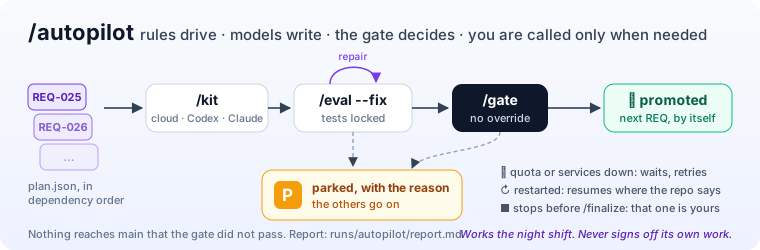
harper_autopilot is the chat’s /autopilot
(commands.md): kit → eval with fix → gate for every REQ,
with the executor configured in VS Code. A REQ that needs you is parked with its reason, the
independent REQs go on; a quota or rate limit, or CLike’s services down, waits and retries. It
resumes where the repository says each REQ is, and by itself after VS Code restarts. It stops
before finalize.
The KIT executor (cloud model, Codex, Claude Code) is the one set in VS Code, or executor for this
run (restored at the end); methodology: "bmad" runs the KIT as the BMAD developer and the eval with
the QA advisory. The agent that calls MCP only starts and reads the run: it can be Claude Code while
Codex writes the KITs, or the other way round. Waiting needs no agent: scripts/clike-autopilot.sh (macOS,
Linux) and scripts/clike-autopilot.ps1 (Windows) poll the server with curl and spend no tokens.
export CLIKE_EXT_MCP_TOKEN="<CLike: Copy Extension MCP Token>"
scripts/clike-autopilot.sh start            # or: start 3 (stop after 3 promoted REQs)
scripts/clike-autopilot.sh start --executor codex --methodology bmad   # executor and methodology of this run
scripts/clike-autopilot.sh --via claude start   # Claude Code calls harper_autopilot (claude -p)
scripts/clike-autopilot.sh --via codex start    # Codex calls it (codex exec)
scripts/clike-autopilot.sh wait             # a status line when something changes, every 5 min (CLIKE_AUTOPILOT_POLL_SECONDS)
scripts/clike-autopilot.sh status           # or stop
--via claude allows only mcp__clike-ext__harper_autopilot; --via codex needs the clike-ext
server with default_tools_approval_mode = "approve" (section 2). Run the scripts from the CLike
folder (any working directory works: they talk to the server, not to the files). The full report
is runs/autopilot/report.md in the project.
4. The next release
Put the requirements of release N in docs/inputs/vN/ (background in docs/reference/vN/), then:
harper_run_phase {phase: "idea", extend: true, release: "v2", dry_run: true}   # report only, to review
harper_run_phase {phase: "idea", extend: true, release: "v2"}                  # IDEA/SPEC/PLAN merged, new REQs
then the same KIT → EVAL → GATE loop on the new REQs and FINALIZE. methodology: "bmad", agent:
"analyst" works here too.
5. What MCP does not do
Autopilot never runs /finalize and never answers a confirmation, a tool install or --accept: parked REQs wait for you. No /init into a new folder (harper_init initializes the open one), no /tools installs, no gate overrides, no git commands, no file writes outside the
phases: those stay with the developer in VS Code. The orchestrator server only reads (its
rag_reindex_* tools rebuild the RAG index).
6. Troubleshooting
| Symptom | Cause and fix |
|---|---|
| “Dynamic Client Registration rejected (HTTP 401)” | the Authorization header is missing: export the token before starting claude, use the .mcp.json above. CLike has no OAuth. |
403 host_not_allowed / server blocked by policy |
use localhost, not 127.0.0.1 |
clike-ext does not connect |
VS Code closed, clike.mcp.extensionServerEnabled off, or another port in clike.mcp.extensionServerPort |
| “CLike is running another Harper phase” | wait for the run (harper_run_status) or cancel_run |
| A Codex tool call times out | lower wait_seconds and poll harper_run_status |
More: mcp.md, agent-operating-model.md, commands.md.