Commands
Chat modes
The extension currently exposes three main chat modes:
free(Q&A)codingharper
The webview keeps separate attachment buckets per mode.
All three modes can run via the cloud or via a local agent (Claude Code / Codex
CLI), selected with the Execution preference (see below). In free, the local
agent answers read-only and the reply is badged with the agent used
(agent-claude / agent-codex); in coding, the local agent writes the
generated files under generated/<id>/ in the workspace root.
Slash commands
The current webview parser supports the following slash commands.
Project / workspace commands
/help/init— with no parameters, initializes the folder open in VS Code, in place (as/init <name> <parent folder> --force); an existing project keeps every file, see Bringing an existing project into CLike/adopt [--area <name>] [--dry-run]— brings an existing project into CLike: survey, baseline, project memory, then the analysis into Harper documents and adopted REQs; see Bringing an existing project into CLike/init <name> [<parent folder>] [--force]—--forceadds CLike to a folder that already has files: only missing template files are created, existing ones are kept,.gitignoregets only the CLike rules it lacks. A repository that already has its own review / PR / CI process (a CI workflow, a code-owners file or a PR template) keeps it: CLike’s.github/CODEOWNERS, PR template and workflow go to.clike/proposals/.github//status/where/switch <name|path>
Harper commands
/idea/idea --extend [--from attachment] [--release vN] [--dry-run]— the next release of a delivered project (see below)/spec/plan/kit/agent-model list— list the models you can set: Codex from your Codex login (~/.codex/models_cache.json), Claude Code the aliases opus/sonnet/haiku and the Claude ids of the catalog;(cloud too)marks a model the cloud selector has as well. The cloud model is chosen separately, in the chat model selector/agent-model [claude|codex] [model]— without arguments: show the execution preference (cloud / agent), the default agent and the models in use; with arguments: set the local agent model (e.g./agent-model claude sonnet); applies to chat and Harper phases, saved in the workspace settings/eval <REQ-ID>/eval <REQ-ID> --fix ["hint"]— auto-eval: repair from the real failures and re-evaluate (seeauto-eval.md)/gate <REQ-ID>/eval <REQ-ID> --accept "reason"— accept a deliberate edit of the REQ’s locked tests /ci/(audited)/eval <REQ-ID> --supersede REQ-x#<check | path::test> "reason"— declare a check or test of a delivered REQ this open REQ changes on purpose (audited), then eval/gate <REQ-ID> --fix ["hint"]— auto-gate: on a failing gate, the same repair as/eval --fix, then a full gate again (seeauto-eval.md)/gate <REQ-ID> manual pass— developer override without executing checks: asks for a reason (≥ 10 characters), is recorded by the orchestrator in an audit log with a digest of the REQ artifacts, and is reported asOVERRIDE, never asPASS. Use only when the gate cannot run (e.g. environment-blocked checks)./tools [search <text> | add <tool[@version]>… | remove <tool>…]— native tools of the eval sandbox (kcat, mysqldump, aws, kubectl, terraform, jdk@17…). CLike installs what an eval needs on its own after asking;/toolsshows the catalog and what is installed,addinstalls and approves for the project (.clike/eval-tools.yaml). Seeauto-eval.md./autopilot [N] [--executor cloud|codex|claude] [--methodology bmad] | stop | status— the REQs of the plan unattended:/kit→/eval --fix→/gateeach, a REQ that needs you parked with its reason (see below)/finalize/extend— appends REQs to the existing plan, plan only (seeCLike_Harper_Extend_Feature.md); for a new release use/idea --extend
Local agent selection
/agent-default auto— let CLike choose the local executor/agent-default claude— prefer Claude Code/agent-default codex— prefer Codex CLI
Optional governed methodology flags are supported on Harper phase commands:
--methodology bmad--methodology=bmad--agent developer--agent=developer
--agent requires --methodology. Methodology identity is separate from profileHint and local agent executor selection.
Full BMAD command semantics are documented in docs/integrations/bmad/COMMANDS.md.
RAG commands
/rag <query>/rag +<N>/rag list/rag clear/ragIndex [glob]/ragSearch <query>
Harper command semantics
/idea
Formalizes or updates docs/harper/IDEA.md and writes the project inputs next to it, in
docs/harper/inputs/:
| File | Content |
|---|---|
REQUIREMENTS.md |
functional and non-functional requirements by area, IDs FR-<AREA>-nn / NFR-<AREA>-nn, with the source of each |
EDGE_CASES.md |
edge cases EC-<AREA>-nn: situation, concrete expected result, requirements they test (derived with a checklist: files and encodings, identity and dedup, normalisation, dates and locales, states, concurrency and idempotency, authorisation and tenancy, external systems, limits, privacy and audit, recovery) |
JOURNEYS.md |
end-to-end journeys E2E-nn across the requirements |
TEST_SCENARIOS.md |
test strategy per layer, faked external systems, golden fixtures |
DECISIONS.md |
open decisions D-nn with a proposed default (an assumption), constraints, data sources |
COVERAGE.md |
every section of every source mapped to the IDs that cover it |
The requirements arrive as the customer gives them (any format): /idea makes them complete and
addressable, never invents facts (what the sources leave open becomes a decision) and never slices
the work (that is /plan). /spec, /plan and /idea --extend read these inputs first, before the
raw documents. Re-running /idea keeps every ID and lists the changes at the top of each file.
Same files and checks with a local agent and in the cloud: each input must exist, have content and
carry IDs.
Sources. The attached files and the project context sources (docs/inputs/, docs/reference/,
or what .clike/context.yaml declares). /idea needs at least one of them: an attachment (use
📎 Attach → + Workspace files or + External files, several at once) or a document in
docs/inputs/.
Attachment handling (via local agent):
- Each file up to 10 MB is inlined and materialized into
runs/idea/attachments/<name>so the agent reads a workspace-local copy (no external-path access). - Files larger than 10 MB are referenced by path only and are not materialized (a warning is shown) — split or shrink them if their content must be used.
- External files are also copied into
.clike/uploads/<name>for portability; the agent always reads the run-local copy underruns/idea/attachments/. - Supported content:
- Text (
.md,.txt,.json,.csv, code, …) — read directly. - PDF — text is extracted and used as evidence.
- Images (
.png,.jpg,.gif,.webp, …) — described via vision (UI screens, layouts, diagrams, visible text) and used as evidence. - Office (
.docx,.xlsx,.pptx) — materialized and read when the executor can parse them.
- Text (
- PDF text and image vision rely on Claude Code’s native multimodal reader. With the Codex executor, image/PDF understanding may be limited.
Non-text binaries are intentionally not sent to the RAG index (only their materialized copy reaches the agent), so attaching many images/PDFs no longer blocks the run.
/idea --extend [--from attachment] [--release vN] [--dry-run] [text]
The next release of a project whose REQs are delivered. One command runs the cascade IDEA → SPEC → PLAN in continuity with what exists:
- Inputs, by release folder. Put the new requirements of release N in
docs/inputs/vN/(for exampledocs/inputs/v2/, thendocs/inputs/v3/for the release after) and background material indocs/reference/vN/. With files indocs/inputs/vN/no attachment is needed, and you can still attach more files (notes, documents, examples): they add to the folder, both are inputs of the release. Withdocs/inputs/vN/empty or missing an attachment is required (as for/idea). Text after the command adds to them. The targeted release is--release vN, else the highest folder above what the plan already holds, else the next one. Inputs of earlier releases (and unversioned files indocs/inputs/) are read as history, never as new requirements. The folders of the targeted release are read even when.clike/context.yamldoes not declare them. - Baseline. CLike checks that the REQs of the current release are delivered (it asks before
going on when some are not) and tags the delivered state before changing the documents: the
release tag
v<N-1>of its/finalizewhen there is one, elseharper/v<N-1>. - Merge, never regenerate. IDEA.md and SPEC.md keep every section of earlier releases; the new
release is added inside the sections it belongs to, plus a
## Release vNsection. TECH_CONSTRAINTS.yaml changes only by addition. A document that drops a section of the earlier release is restored and the run says so. - Use cases, as
/specwrites them. Every journey the release adds or changes is a use case of SPEC.md## Use Cases(### UC-nn — <name>, stepsUC-nn.n, errors, prerequisites); a SPEC without the section gets it, with at least the journeys of the release. The new REQs cover their steps (coversin plan.json). The CLike verification of the report counts them and warns when the release adds REQs without a use case;/finalizethen verifies the solution journey by journey. - PLAN delta. Delivered REQs are read-only (CLike restores any change). New REQs continue the
sequence with
release,originandchange:ADDED— a new capability (prefer extending an existing seam);MODIFIED— changes behavior a delivered REQ verifies:amends: ["REQ-x"], the changed criteria restated in full,supersedes: [{"check": "REQ-x#<LTC check id>", "reason": …}],unchanged: [...];REMOVED— retires a capability:retires: ["REQ-x"]. Targets must exist and be delivered; a superseded check must exist in the REQ’s LTC (any of its check sections); a superseded test named without its REQ gets the amended REQ that owns it. A plan that breaks these rules is rejected: the documents and lane guides are restored, and what the run wrote is kept underruns/extend/rejected/<time>/for comparison. The PLAN.md sections that index every REQ (REQ-IDs table, dependency graph, test strategy, KIT readiness) list the new REQs too: CLike adds any the agent left out.
- Areas (a monorepo of modules). When
.clike/project.jsondeclaresareas, every new REQ names itsarea(areasfor a journey across modules). A new module is a new area: its first REQ declares it withnew_area(root,source,tests,commands) and CLike adds it to.clike/project.jsonwhen the release is accepted. A REQ without an area, an unknown area or a new area inside an existing one rejects the plan. Withoutareasnothing changes. Examples: Bringing an existing project into CLike. - Project inputs of the release. When
/ideaderived the project inputs (docs/harper/inputs/), the release writes their deltadocs/harper/inputs/RELEASE_vN.md:## Requirements,## Edge cases,## Journeys,## Test scenarios,## Decisionsand## Coverage(the sections of the release’s sources mapped to IDs). New IDs continue the numbering, a changed item keeps its ID (changed in vN), a removed one iswithdrawn in vN; the base files stay as/ideawrote them./spec,/planand the next release read the delta of the current release first. - BMAD and UX companions of the release. When the project has companions
(
docs/harper/bmad/<folder>/,docs/harper/ux/), every later phase still reads them — the KIT too,ux/is its UI reference — so the release writes their delta, one file per folder:docs/harper/bmad/releases/vN/BMAD_<FOLDER>.mdanddocs/harper/ux/releases/vN/UX.md, with one## <companion file>section each (what the release adds or changes, orNo change: <why>). The companions themselves are not rewritten (they can be larger than one answer), and the deltas of the current release are read before them.--methodology bmad --agent analyst|pm|architect|uxworks on the cascade (default rolepm): the role leads the angle, CLike’s rules and checks stay in charge (seeintegrations/bmad/COMMANDS.md). The CLike verification of the report says, for each delta, whether it is written and complete; a rewrite of the base inputs or of a companion is ignored. - Report.
docs/harper/EXTEND_<date>_<first>_<last>.mdwith the changes and why, the delta table, impact, unchanged behavior and open questions, plus a CLike verification section CLike writes itself.--dry-runkeeps only the report. - Then as usual:
/kit,/eval --fixand/gatefor each new REQ,/finalizeat the end of the release. In the regression, the checks aMODIFIEDREQ supersedes leave the amended REQ’s regression (reported assuperseded), and a REQ retired by aREMOVEDREQ leaves the regression set; every other check of delivered REQs keeps running.
Projects not built with CLike: put their documentation in docs/reference/ and the new needs in
docs/inputs/v2/; taking over the existing code base inside /idea --extend is the next step
(see architecture/ADOPT_AND_IDEA_EXTEND.md). Until then /idea --extend needs a plan with REQs.
/spec
Generates or updates SPEC.md from current Harper context. It also writes TECH_CONSTRAINTS.yaml
from the Technology Constraints block of IDEA.md — except with --methodology bmad --agent ux
(companion-only: UX documents in docs/harper/ux/ only) and once the project has releases
(/idea --extend owns TECH_CONSTRAINTS from then on, by addition).
SPEC includes Use Cases: every production journey end to end (### UC-01 — …, numbered steps
UC-01.1… with interface and data, error flows, the production data path, and the Prerequisites
each journey implies — sign-in and session expiry for an authenticated API, authorized download and
retention for an export… — in scope or provided by someone named).
SPEC decides ordinary choices the IDEA leaves open (formats, limits, validation, error
responses, interface shapes, defaults, counting or timing rules): the simplest reasonable option,
written in Assumptions as decided. Only what nobody but the owner can answer (an external value or
credential, a legal or business commitment) stays open, as OPEN-01 — <question> (owner: <role>):
answer it in the Note from Harper Orchestrator section and run /spec again. A detail still open
does not stop /kit: the KIT takes the simplest option consistent with SPEC and PLAN and records it.
/plan
Generates or updates PLAN.md and plan.json.
Each REQ lists in plan.json the use-case steps it implements (covers). After /plan (and
/idea --extend) CLike checks that every step of every SPEC use case is covered by a REQ and
says which are not (⚠ USE CASES: …), for cloud and local agents alike; a SPEC without a Use Cases
section is not checked.
Each REQ also says whether it is KIT-ready (kit_ready, blockers in plan.json): ready unless
it cannot be built without an owner’s answer. After /plan CLike lists the REQs that wait and their
questions (⚠ KIT READINESS: …); /autopilot parks them before /kit (no agent run) and a manual
/kit runs with a warning. A plan without kit_ready is ready.
/kit
Runs the base KIT flow by default or explicit follow-up KIT phases. The candidate lives in
runs/kit/<REQ>/ (src/, test/, ci/, docs/, and root/<path> for repository-root files such
as scripts/ or deploy/, promoted to <path> — see git-and-promotion.md).
Supported patterns in current parser:
/kit
/kit REQ-001
/kit REQ-001 --integrity
/kit REQ-001 --hardener
/kit REQ-001 --promotion-eval
/kit REQ-001 --phases=kit,integrity_eval,promotion_hardener,promotion_eval
Normalized follow-up phase names currently used by the sources:
kitintegrity_evalpromotion_hardenerpromotion_eval
/kit <REQ-ID> with clike.kit.acceptanceFirst
Acceptance-first KIT: first the acceptance tests and eval profile (from SPEC/PLAN), locked; then
the code against them. See harper-workflow.md.
/eval <REQ-ID>
Runs eval for the target REQ using candidate artifacts and LTC.json. With
clike.eval.regression (default on) it also re-runs the acceptance checks of every
promoted REQ (plan status done) against the new code (regression::<REQ>::<check>).
/eval <REQ-ID> --fix ["hint"]
Auto-eval: eval, then on failure a KIT repair built from the failed checks and the current
candidate files, then eval again, up to clike.autoEval.maxCycles (default 2). Tests stay
locked; LTC command fixes are audited. Re-run to continue. The hint is optional: CLike flags
failures that passed in earlier runs as nondeterministic, and writes what each repair received
in runs/eval/<REQ>/repair_<REQ>_<ts>.md. See auto-eval.md.
/eval <REQ-ID> --accept "reason"
The tests and ci/ of a REQ are locked at its first eval; an edit made afterwards blocks the
eval and the gate of that REQ and of every later REQ whose regression runs it (the acceptance
surface of REQ-002 changed after the lock). When you changed them on purpose — e.g. you
completed a promoted REQ’s ci/LTC.json by hand — this accepts the edit without a new /kit:
the orchestrator records the files, your git config user.name and the reason (at least 10
characters; asked when missing) in the lock and in the audit log. Only edits that weaken nothing
are accepted: a removed file, an LTC check removed, made non-blocking or with another command,
or an added skip marker still needs the files restored or /kit <REQ-ID>. It runs no eval:
run /eval again afterwards.
When a repair proposed a change to a locked test (the loop stopped with
runs/eval/<REQ-ID>/proposed_test_fix_<ts>.patch), --accept first applies the latest proposal
that still applies, then records it as above: review the patch, then one command. A proposal the
lock still refuses is undone.
/eval <REQ-ID> --supersede REQ-x#<check | path::test> "reason"
A release can change on purpose what a delivered REQ verifies, and /idea --extend names those
checks and tests in the new REQ’s supersedes. When the eval shows one it did not name — typically
a delivered test that pins a complete list or the latest item the release extends (the exact fields
of a response, the set of routes, the last migration) — the regression note says so and gives this
command, and a stopped --fix loop repeats it: a repair never changes the plan, the decision is
yours. CLike checks that the REQ is open, the target REQ is delivered and the check is in its LTC
(or the test file is in its KIT or the project and names the test), adds the entry to supersedes
(and the REQ to amends; an ADDED REQ becomes MODIFIED), records it with your git config
user.name in runs/extend/declared-supersedes.jsonl, then runs the eval (--fix and the other
flags still apply). The superseded test is recognised in whichever promoted REQ’s check runs it.
/gate <REQ-ID>
Runs gate checks for the target REQ using eval output and gate policy. Warnings (failed
non-blocking checks) do not block unless clike.gate.strictWarnings; regression failures
block with GATE_BLOCKED_REGRESSION. When nothing changed since a passing /eval (same files,
LTCs and REQ statuses), the gate reuses that verdict instead of running everything again; the
acceptance integrity and required outputs are still checked (see auto-eval.md, Speed).
/gate <REQ-ID> --fix ["hint"]
Auto-gate: when the gate fails (checks, regression, required outputs), a KIT repair with the same
rules as /eval --fix, then a full gate again; only a gate run on the repaired candidate
promotes it. It stops on a tampered acceptance surface and does not try to resolve promotion
conflicts. Notes per cycle in runs/gate/<REQ>/repair_<REQ>_<ts>.md.
/eval --fix and /gate --fix stop, instead of repairing code, when the failure is not the code:
the sandbox ran out of resources (EVAL_SANDBOX_EXHAUSTED), a native tool is still missing
(missing_tools), or CLike could not prepare the eval workspace. A promoted REQ’s test that fails
and then passes on a re-run is a nondeterministic warning, not a regression. A regression caused by
files the candidate replaced names those files, with a short diff, for the repair.
/autopilot
/autopilot [N] [--executor cloud|codex|claude] [--methodology bmad], /autopilot stop, /autopilot status.
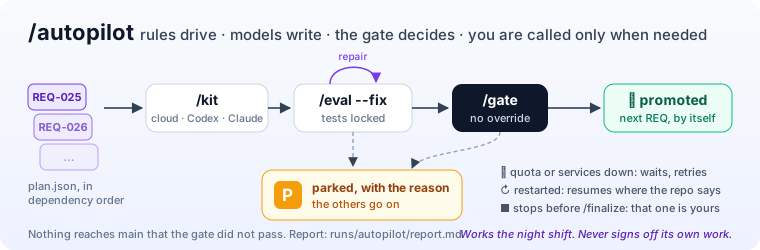
The REQs of the plan one after the other, unattended, in dependency order: /kit, /eval --fix,
/gate for each, through the same chat handlers — same executor (cloud model, Codex or Claude
Code, as configured), same locks, gate, promotion and audit as when you type them. No model decides
the loop: a fixed rule picks the next REQ (harper_next_action: an in-progress REQ first, then the
first open REQ whose dependencies are done).
- A REQ that needs you is parked with its reason (eval
--fixstopped, gate not passing, promotion not done, an acceptance edit to--accept, a value only you have, a native tool to approve: nobody answers the prompts, so they count as no). The REQs that do not depend on it go on; the loop ends when none can. - A REQ the plan marks not KIT-ready (
kit_ready: false: it waits for an owner’s answer) is parked before/kit, with its questions, without running an agent; the next/autopilotreads the plan again, so answering and re-running/specand/planreleases it. - It knows where it is. An in-progress REQ resumes from what the repository holds: no KIT →
/kit; its last eval passed on exactly the current files (same inputs fingerprint) → straight to/gate; otherwise/eval --fix. A REQ parked by an earlier run stays parked while its files are unchanged and is retried as soon as you change them (you fixed it). - It restarts by itself. Its state is in
runs/autopilot/state.json(not committed). A run that never ended (VS Code closed, crash, reboot) resumes when VS Code opens on the project again, with the same options (clike.autopilot.resumeOnStartup, on)./autopilotwithout options after an interruption does the same;stopand Cancel end it for good. - A provider quota or rate limit (429, usage limit), or CLike’s services not answering (restarting,
sandbox out of resources), is not a failure: the step waits
clike.autopilot.quotaWaitMinutes(30) and retries, at mostclike.autopilot.quotaRetries(8) times, then parks the REQ. Nstops after N promoted REQs;stopafter the current step; Cancel stops it now.--executor cloud|codex|claude: who writes the KITs and the repairs in this run (the chat’s execution preference and local agent, set for the run and restored at the end); without it, as configured. The agent’s model stays the one set with/agent-model.--methodology bmad: the KIT runs as the BMAD developer, the eval with the BMAD QA advisory; the gate is CLike’s.- A gate that promoted test fixes made by a repair is listed for your review (gate REVIEW).
- It stops before
/finalize, which stays yours. Needsclike.gate.autoPromotemerge(oroff).
From Claude Code, Codex or a terminal: the MCP tool harper_autopilot and scripts/clike-autopilot.sh / .ps1
(howto-mcp-project.md).
Report (rewritten at every step, not committed): runs/autopilot/report.md — promoted REQs with
repair cycles and duration, parked REQs with the step, the reason and the last messages, REQs
retried because they changed, waits, what to do next. Do not run other Harper phases while it runs.
/tools [search <text> | add <tool[@version]>… | remove <tool>…]
Native tools of the eval sandbox. CLike installs what an eval needs on its own: before an eval or
gate it finds the programs the REQ declares (environment.tools in ci/LTC.json) or runs, and
asks Install / Always for this project / No (clike.evalTools.install: ask | always |
never). /tools lists the catalog by group and what is installed; search matches name,
description or program; add accepts a catalog name or the program (mysqldump, kcat), with
an optional version (jdk@17), installs it and approves it for the project in
.clike/eval-tools.yaml; update [tool…] rebuilds them at the latest versions and prints
old → new (a failed rebuild keeps the previous version); remove withdraws the approval (the
installed files stay in the shared tools volume). /tools shows the installed versions and reminds
you after 30 days. Libraries of a language belong to the project manifest. See auto-eval.md.
/finalize --verify
The verification of the last /finalize again, without a new agent run: the solution eval in
the sandbox, the local check on your machine, the outcome, the release tag and its notes. It costs
no tokens when it passes; on a failure the repair agent runs as in a full /finalize. Use it after
a finalize stopped before its end, or after a fix you made yourself (a busy port, a configuration
value).
/finalize
Brings the promoted solution to running and configured: it wires what is missing, writes the
run docs and scripts and ci/SOLUTION_LTC.json, the eval profile of the whole solution
running. If some REQs are not promoted yet, CLike lists them and asks before it starts.
The REQs’ tests are not run again: each REQ passed them at its gate. With no flag
(clike.finalize.verify, default on) CLike runs ci/SOLUTION_LTC.json in the eval sandbox
against the canonical tree (runs/, .git, .clike/ are not copied):
setup: install of every component and build of what needs one to run, before anything starts, 2. the solution configured and started as services (migrations, backend, workers, frontend, with readiness), 3. smoke checks of the running solution (ci/solution/): health, one real request per main capability, the main UI pages answering with their content.
When it fails, /finalize runs again with all its errors (same loop rules as /eval --fix:
clike.finalize.verifyMaxCycles, default 3, plus extra cycles while the failures decrease). The
repair looks for the cause in order: configuration (variables, URLs, ports, services, migrations),
missing native tools, wiring, then code; a missing variable is provisioned and documented, never
hardcoded. A local agent (Codex, Claude Code) re-runs the profile’s checks in the sandbox itself
while it works (node .clike/bin/eval-check.mjs) and runs scripts/check_solution_local.sh /
.ps1 on your machine. A repair cycle that cannot run says so and stops.
When the plan or the code shows a database or an auth provider, the result must carry its
configuration: a variable for it in .env.example (the project’s own name counts, e.g.
APP_DB_PATH) and the boundary in src/. A boundary already in the promoted code counts as it
is: finalize does not need to rewrite it.
What you get:
README.md— the project README, marked as a CLike project: CLike, Harper and Finalize badges (linked to the CLike repository, its Harper lifecycle andFINALIZE_REPORT.md) and a closing Made with CLike section with links to the Harper documents, the report and the solution evidence. A README without it fails the verification and the next repair cycle adds it.docs/harper/FINALIZE_REPORT.md— the report for you: how to start the solution and see each main capability, every configuration variable (purpose, value or how it is generated, who sets it), missing information only you can give (what, why, where to get it, where to put it), everything/finalizechanged file by file and why, the problems met and how they were solved, the limitations left. If/finalizedoes not write it, the verification fails and the next repair cycle writes it.scripts/setup_local.sh/.ps1(creates the local, git-ignored configuration from.env.example: local URLs, generated secrets, local database; never overwrites a value) andscripts/start_solution_local.sh/.ps1(starts everything and prints the URLs). Published host ports come from that configuration: setup picks a free port when the default is taken on your machine (for example by the CLike gateway on 8000), start names the port and the variable to change when one is busy. After a passing verification CLike offers Configure locally or Configure and start, in a terminal you see.docs/harper/SOLUTION_EVAL.md— what CLike verified: the checks, the verification cycles and the last gate of every REQ (the acceptance tests, not run again).
The profile, its smoke scripts, the evidence and the report are committed when the verification
ends; changes you had in the working tree before /finalize and that it did not touch are left
out of its commits (recorded by content in runs/finalize/DIRTY_BEFORE.json until a finalize
commit succeeds, so the work of an earlier run that ended before its commit is still committed).
The local check. The sandbox runs the solution natively on loopback; your default start
usually runs it in containers. When the verification passes, CLike runs
scripts/check_solution_local on your machine (clike.finalize.localCheck: ask by default,
always, off; it builds, starts, runs the smoke and stops the local stack). Its output is in
runs/finalize/LOCAL_CHECK.md; a failure is sent to the next repair cycle as the check
local::check_solution_local, and when the cycles are over /finalize is marked failed.
The release. The finalize commit names the release and its REQs
(chore(release): finalize v2 — <project>, one line per REQ with its change type). When the
verification passes, CLike tags that commit with the annotated tag vN (the highest release in
plan.json) and writes the release notes to runs/finalize/RELEASE_vN.md, built from the
documents, not by the agent: the scope, the REQs delivered with their gate merge commits,
RELEASE_NOTES.md, how to start, missing information, verification, limitations, links to the
report and the evidence, and the full changelog since the previous release tag. Publishing the
release on the repository host is asked first (it is public): Publish release pushes the tag and
creates the release (or updates it, assets replaced) with title, notes, latest, pre-release
when the verification passed with warnings, and the three documents attached. From MCP or
unattended runs it is never published; CLike: Publish release (Command Palette) does it later,
for the last passing /finalize. An existing vN on another commit is never moved. The next
/idea --extend takes vN as its baseline.
Deployment target from TECH_CONSTRAINTS.yaml: on-premises/local — the local run is the
target and must work on the developer’s machine; cloud — guarded deploy scripts too (mutating
only with CLIKE_ALLOW_CLOUD_MUTATION=1), checked non-mutating (validate/plan); the deploy itself
is always an explicit action.
KIT follow-up phases
The current sources support follow-up KIT phases, but they are not equivalent to base KIT generation.
Base phase
kit
Follow-up phases
integrity_evalpromotion_hardenerpromotion_eval
The extension performs preflight checks for required candidate artifacts before allowing follow-up phases.
RAG slash semantics
/rag <query>
Searches RAG and displays top results.
/rag +<N>
Attaches a result from the last RAG search to the next call.
/rag list
Lists current inline and RAG attachments.
/rag clear
Clears current attachments.
/ragIndex [glob]
Triggers manual indexing into the orchestrator RAG.
/ragSearch <query>
Explicitly searches RAG through the orchestrator search path.
Extension commands
The extension also contributes direct VS Code commands.
Service authentication
clike.setServiceToken— CLike: Set Service Token: paste the stackCLIKE_API_TOKEN, or generate one (the.envline is copied to the clipboard). Stored in SecretStorage.clike.clearServiceToken— CLike: Clear Service Tokenclike.copyExtensionMcpToken— CLike: Copy Extension MCP Token: token for clients of the extension’s operational MCP server
Chat / session
clike.openChatclike.chat.clearSessionclike.chat.openSessionFile
Harper / project
clike.harper.init
Code actions / generation
clike.codeActionclike.addDocstringclike.refactorclike.generateTestsclike.fixErrorsclike.applyUnifiedDiffHardenedclike.applyUnifiedDiffclike.applyNewContentclike.applyLastPatch
Models / services
clike.listModelsclike.checkServices
RAG
clike.ragReindexclike.ragSearch
Git / promotion
clike.gitCreateBranchclike.gitCommitPatchclike.gitOpenPRclike.gitSmartPRclike.promoteReqSourcesclike.promoteReqSourcesQuick
Code-action intent surface
The orchestrator agent endpoint currently supports at least these intent families from the code-action path:
docstringrefactortestsfix
These flows are repository-file oriented and not Harper-phase oriented.
Execution preference
The extension passes an execution preference with every chat request.
Execution-agent (local-agent) execution is available for the Harper phases
/idea, /spec, /plan, /kit, /eval, /finalize, and /extend, and for
the standalone free (Q&A) and coding modes. With prefer_local_agent or
local_agent_only, supported flows run through the local-agent path;
cloud_only and auto keep using the cloud path. For the early Harper document
phases the local agent writes only the canonical Harper outputs
(docs/harper/IDEA.md, docs/harper/SPEC.md, and docs/harper/PLAN.md +
docs/harper/plan.json with lane guides), and all other docs/harper/ paths
stay protected. For standalone coding, the local agent writes under
generated/<id>/ in the workspace root. Cloud and local execution remain
semantically equivalent and CLike governance stays canonical.
agent only (local_agent_only) is the default Execution preference. Provider
availability is computed at the gateway from configured API keys: when no cloud
provider key is set, the cloud-dependent Execution options are disabled and only
agent only remains selectable; the model list also hides models whose provider
has no configured key. A provider/key mismatch is reported in the chat Text
panel.
Methodology Profile
BMAD is a CLike-owned methodology profile. BMAD is not an executor and does not create a parallel pipeline. It enriches Harper phase behavior with role guidance while CLike keeps authority over canonical artifacts, companion artifacts, local-agent packages, eval, gate, telemetry, audit, and promotion.
Supported BMAD roles:
analystpmarchitectdeveloperuxqatech-writer
Phase defaults:
idea->analystspec->pmplan->architectkit->developereval->qaadvisory onlygate-> CLike-only, no BMAD authorityfinalize->tech-writer
Common command forms:
/idea --methodology bmad --agent analyst
/spec --methodology bmad --agent pm
/spec --methodology bmad --agent ux
/plan --methodology bmad --agent architect
/plan --methodology bmad --agent pm
/kit REQ-001 --methodology bmad --agent developer
/kit REQ-001 --repair --methodology bmad --agent developer
/eval REQ-001 --methodology bmad --agent qa
/eval REQ-001 --methodology bmad --agent developer
/eval REQ-001 --fix --methodology bmad --agent qa
/finalize --methodology bmad --agent tech-writer
With /eval REQ --fix --methodology bmad, the methodology holds for the whole loop: each repair is a
BMAD developer KIT, each re-eval keeps the chosen advisory role. The ▶ KIT / ▶ EVAL lines show it
(methodology=bmad/developer, methodology=bmad/qa). The chat echoes the command as typed.
SPEC has an explicit PM/UX ownership split:
/spec --methodology bmad --agent pmmay produce canonicaldocs/harper/SPEC.mdthrough normal CLike SPEC governance and companion PM artifacts underdocs/harper/bmad/spec/**./spec --methodology bmad --agent uxis companion-only in the current MVP. It may produce UX artifacts underdocs/harper/ux/**, includingSPEC_UX_APPENDIX.md, but must not overwrite canonicaldocs/harper/SPEC.md.
Gate remains CLike-owned. /gate REQ-001 --methodology bmad and /gate REQ-001 --methodology bmad --agent qa are rejected by the slash parser in the current MVP.
Injection boundaries:
- Cloud Harper runs receive resolved
methodology_contextonly through Gateway cloud prompt composition. - Local-agent runs receive resolved
methodology_contextthroughlocal_agent_packageinAGENT_*_CONTEXT.jsonandAGENT_*_PROMPT.md. - Gateway is not used as a local-agent prompt builder.
- Methodology guidance cannot expand
allowed_write_rootsor overrideforbidden_paths.
For the complete governance model, see docs/integrations/bmad/GOVERNANCE_MODEL.md.
Current normalized values
autocloud_onlyprefer_local_agentlocal_agent_onlyhybrid
Backward compatibility
Legacy values are normalized:
prefer_claude_code→prefer_local_agentclaude_code_only→local_agent_only
Local executor selection
Current executor choices:
autoclaude_codegpt_codex
There is no current slash command in the inspected sources that changes the default local executor from chat. Executor choice is currently configuration-driven and state-driven, not command-driven.