The CLike chat (UI)
What the developer sees in VS Code. The chat is the front of CLike: every command goes through it (or through MCP from Claude Code / Codex), and it shows what CLike does, step by step. The UI never decides anything: the phases, the eval and the gate are CLike’s (orchestrator, eval sandbox, gateway); the chat starts them, shows them, and lets you stop them.
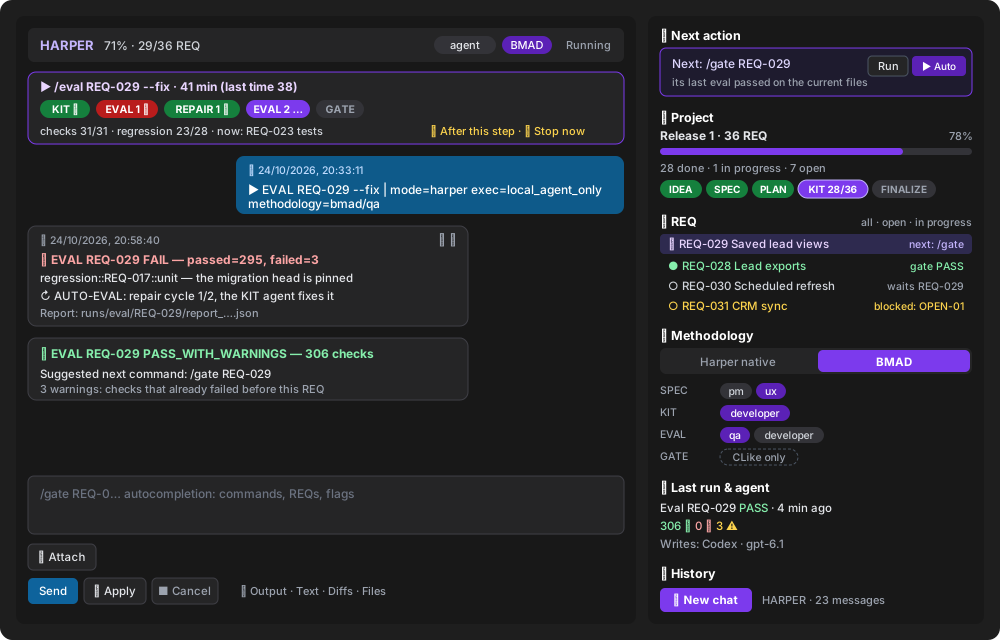
What it is
- Chat on the left: your commands and messages, CLike’s answers as cards (one card for what a command says while it runs, with the time of each message). Each bubble has ⧉ copy and 🗑 delete.
- Cockpit on the right (
clike.chat.theme: cockpit, the default): the state of the project read from the repository (plan.json, the Harper documents, the eval and gate reports), not from a model. - Run card above the chat and the VS Code status bar: the command in flight.
Beside the editor (narrow) the cockpit becomes one column with the side panel in a drawer (☰).
The other layouts (classic, pro, studio, paper) have the same features.
What it does
| Area | Shows | You can |
|---|---|---|
| Mode & settings | mode (Free · Coding · Harper), execution (cloud / agent), cloud model, local agent and its model, history scope | change any of them; the agent models listed are the ones the CLI accepts |
| Methodology | Harper native or BMAD, with the role per phase where BMAD allows more than one | choose it; it is added to the commands the cockpit proposes |
| Project | release, REQs done / in progress / open, phases IDEA → FINALIZE; 100% only when every REQ is done and the last /finalize passed (a failed one stays the next action, with its reason) |
— |
| Next action | the next command by the autopilot’s rules (phase order, dependencies, last eval), with alternatives | Run it, or ▶ Autopilot for every REQ unattended |
| REQ | each REQ with what it waits for: a dependency, its next step, gate PASS, or blocked when the plan says it waits for your answers (kit_ready: false, the questions in the tooltip) |
click a REQ to put its next command in the prompt |
| Last run & agent | the last eval or gate (status, failed checks, warnings) and who writes (cloud model or agent) | — |
| History | earlier conversations of the mode | + New chat; reopen one with a click |
Run card (every layout): the real steps of the command (KIT, EVAL 1, REPAIR 1, EVAL 2, GATE…)
with their outcome, the cycle of a --fix loop, time and an estimate from the last time, the
eval’s checks as they run in the sandbox (13/31 · now: test:e2e, then the regression of the
promoted REQs 23/28), what the agent is doing, the cost. ⏸ After this step lets the current
step finish (its report is kept) and starts nothing new; ⏹ Stop now (or Esc) first says what
stopping loses (a running eval leaves no report, files an agent wrote stay uncommitted), then stops.
🧠 Memory (every layout): opens the Memory panel — the project’s RAG memory and the CLike guide, queried in any language — or brings it to the front; it works while a command runs. See rag.md.
Autocompletion: type / — commands, then the REQs that fit, flags and values; an invalid
command shows the parser’s error with its fix before you send.
Settings that change the UI
VS Code settings (Ctrl/Cmd+,, search clike), or settings.json:
| Setting | Default | What it changes |
|---|---|---|
clike.chat.theme |
cockpit |
the layout: cockpit (chat + project side panel), classic, pro, studio, paper. Also switchable from the Layout selector in the chat; every layout has the same features |
clike.execution.defaultPreference |
local_agent_only |
the execution shown and used at start (cloud or local agent); the Mode & settings area changes it for the session |
clike.localAgent.preferredExecutor |
gpt_codex |
the local agent selected at start |
clike.chat.maxInMemoryMessages |
50 |
how many messages the chat keeps on screen (older ones stay in the history) |
clike.chat.persistDir |
.clike/sessions |
where the conversations of the History are saved |
clike.agentChat.approvals |
ask |
in Coding mode, whether the chat asks before each edit or command of the local agent |
After a successful /finalize the project’s README.md opens rendered (reading mode), as the
gate opens its promotion report.
How it relates to CLike
- The cockpit reads; CLike decides. The next action follows the same rules as
/autopilot(autopilot.js); KIT readiness comes fromplan.json(plan-readiness.js); eval and gate states from the saved reports. - The run card’s eval progress comes from the sandbox (
GET /v1/eval/progress): it is shown, never used for a verdict. - Stop and Cancel reach the running phase, the eval and the local agent (see GET_STARTED — Talking to the agent directly).
Commands: commands.md. The process: harper-workflow.md. The whole picture: clike-at-a-glance.md.